WhatsApp: +86 139 2872 8741
Email: [email protected]
Tel:
0086-757-8938 9313
0086-20-8938 9313
Address:
Caochang Industrial Area, Liguang Rd, Lishui, Nanhai, Foshan, Guangdong, China
Reply within 1 hour, 24x7 online service

WhatsApp: +86 139 2872 8741
Email: [email protected]
Tel:
0086-757-8938 9313
0086-20-8938 9313
Address:
Caochang Industrial Area, Liguang Rd, Lishui, Nanhai, Foshan, Guangdong, China
Reply within 1 hour, 24x7 online service
The problem in one line: an animated EL poster is not one light switching on and off – it is several regions lighting in an order, and the order lives in the controller, not the artwork.
We build animated EL posters in Foshan: printed zones, a sequence controller, and an animation map approved in writing before anything is printed. This page explains how zones are made, how the controller drives them, which options suit which venue, and where buyers lose time. For the venues themselves, the applications guide covers eight settings in detail.
| Item | What we confirm in writing |
|---|---|
| Zones | Typically 2-8 lit regions per poster |
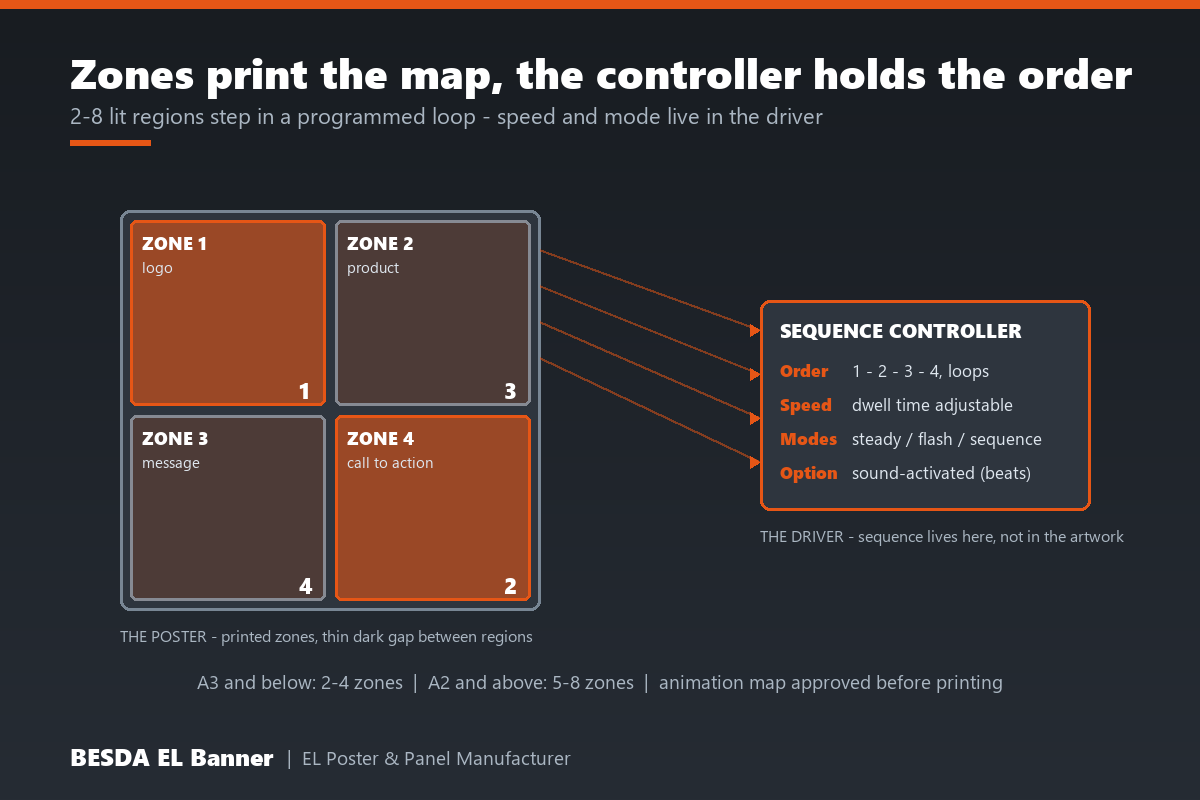
| Zone count by size | A3 and below: 2-4 zones; A2 and above: 5-8 zones |
| Controller modes | Steady on, flash, sequenced loop, sound-activated |
| Sequence | Programmable order and speed; loops for the whole campaign |
| Artwork input | Layered AI or PDF plus a zone map; reference video welcome |
| Approval gate | Animation map signed off before printing – the key de-risk step |
| Sampling | Mockup first; physical sample within 7 days of mockup approval |
| Order size | Low MOQ accepted – most first animated runs start from 5+ pcs |
| Production | 7-10 days standard runs; 15-20 days for larger bulk |
| Certificates | CE, FCC and RoHS available per project on request |
A static EL poster has one lit face. An animated poster has the same face divided into lit zones – separate regions that can switch on in an order. The separation is printed into the panel itself: each zone keeps its own conductor route, and a thin unlit gap between zones keeps one region from bleeding into the next.
The motion comes from the driver end. A sequence controller feeds the zones in turn – logo, then headline, then call to action – and loops. Because the sequence is programmed in the controller, the same panel can run a slow loop in a restaurant and a faster one at a launch without reprinting anything.
Set expectations honestly here: zones are not video. There are no gradients or moving objects, only regions stepping in an order. That constraint is also the charm – the glow steps like theatre lighting, which reads as crafted rather than screen-like. Our explainer on how EL posters work covers the underlying stack and inverter.
Motion stops people. In a dim venue a static glow is background; a stepping sequence makes eyes stop. The first zone pulls attention to the second, which is worth more than any single brighter panel.
The order tells the story. Brand mark first, product second, offer last – the sequence is a message hierarchy a static poster cannot express. Event teams use it to pace a launch: tease, reveal, call to action.
No screen, no software, no power bill. A zone poster runs from a small driver, hangs flat, and needs nobody to press play. The animation is inside the product.
It upgrades artwork you already have. Most campaign key visuals split naturally into 2-4 zones. The step from static to animated is a planning decision, not a redesign.
1. Zone design. Your artwork is divided into regions that make sense as story beats – not arbitrary rectangles. A bottle lights before its flavour name; a logo before its tagline.
2. Printed separation. Each zone is isolated in the panel print with its own conductor route and a thin dark gap between regions. Zone edges are as deliberate as the artwork itself.
3. Controller sequencing. The sequence controller drives each zone in turn – order, dwell time and speed are set in the driver, and loop for the campaign.
4. Mode selection. The same hardware usually supports steady on, single-zone flash, sequenced loop and sound-activated modes, switchable rather than fixed.
5. Approval before print. The zone map – which region lights, in what order, at what pace – is signed off in writing. After that the sample is a preview, not a negotiation.
| Mode | What it does | Best for | Note |
|---|---|---|---|
| Steady on | All zones lit, no sequence | Menus, always-on signage | The safe default; zero moving parts |
| Flash | One region blinks | A single offer line | Simplest animated step up from static |
| Sequenced loop | Zones light in order, loops | Launches, brand stories | Order and speed set in the controller |
| Sound-activated | Zones trigger on beats | Bars, clubs, trade shows | Needs ambient music; silent venues defeat it |
One acoustic honesty note: high-frequency driving can produce a faint hum audible within arm’s reach, and sound-activated modes add a microphone to the driver. Quiet venues should ask for the silent-type driver in the brief – it is a confirmable option, not a surprise to discover on site.
| Poster size | Workable zones | Why |
|---|---|---|
| A4 and smaller | 2-3 | Region width drops fast; fine zones read as dim strips |
| A3 | 2-4 | The sweet spot for logo-plus-message sequences |
| A2 | 4-6 | Room for a three-beat story plus a call to action |
| A1 and larger | 5-8 | Full sequences; confirm the map before tooling |
More zones is not more animation – past the workable count for a size, zones thin out and glow unevenly. The sequence design matters more than the zone count, and a clean three-beat loop usually outperforms a cramped eight-zone pattern.
Bar and club walls. The classic home: dim room, music already playing, a sequenced logo visible across the room. Sound-activated modes shine here.
Product launches. Tease, reveal, call to action – the three-beat sequence mirrors the presentation running next to it.
Freezer and beverage doors. A bottle zone lighting before the flavour message draws the eye down the aisle; battery or 12V power fits the cabinet.
Trade show stands. Flat-packed panels that animate on arrival, hung on the stand wall without rigging or screens. Our applications guide rates eight venues honestly.
Retail windows at night. A stepping window display keeps passers-by watching through the loop without any staff input.
| Animated EL poster | Static EL poster | LCD screen | |
|---|---|---|---|
| Motion | 2-8 zones stepping | None | Full video |
| Content change | Re-sequence in the controller | New print | New file, instantly |
| Installation | Flat, light, hangs anywhere | Flat, light | Rigging, power, mounting |
| Attention value | High in dim venues | Even glow | High but common |
| Maintenance | A driver, nothing else | Almost none | Software updates, failures |
| Best role | The crafted middle ground | Quiet messaging | When video is the brief |
The middle ground is the point. If the brief truly needs video, a screen wins and we will say so. If the brief needs attention in a dim room with zero maintenance, zones usually beat both neighbours.
| Situation | Verdict | Why |
|---|---|---|
| Dim venue, music or crowd | DO IT | Motion plus glow is the strongest pull per watt |
| Story has clear beats – logo, product, offer | DO IT | The sequence expresses what a static cannot |
| Same artwork runs many venues | DO IT | Controller holds the animation; panels repeat cheaply |
| Bright daylight window | SKIP IT | EL loses contrast in strong light – zones will not fix that |
| Tiny artwork crammed with regions | SKIP IT | Zones thin out and read as dim strips |
| Real video content required | SKIP IT | Zones step, they do not play – use a screen |
| Silent luxury interior | ASK FIRST | Standard drivers can hum; confirm the silent type |
1. Name the story beats. What lights first, second, last? Three beats are enough for most posters; write them in one sentence.
2. Send layered artwork plus a reference. AI or PDF with layers, and a video or GIF showing the rhythm you want. We translate it into the zone map.
3. Match zones to size. A3 and below: 2-4. A2 and above: 5-8. Resist the urge to fill every corner.
4. Choose the mode for the venue. Sequenced loop for controlled spaces; sound-activated only where music plays all night.
5. Confirm the driver early. Power source, silent type, connector exit – the same decisions as any build, per our power supply comparison.
6. Approve the animation map in writing. Then the sample within 7 days is a preview of a settled design, and the run follows a signed spec sheet.
Too many zones on a small panel. Eight regions on an A4 thin every strip and dim every edge. Match the count to the size table and the glow stays even.
Skipping the map approval. The animation map is the one cheap place to change your mind. After printing, a zone change is new tooling.
Sound-activated in a silent venue. The microphone waits for a beat that never comes and the poster sits dark. Pick the sequenced loop instead.
Judging rhythm in a bright office. Sequences read differently under ceiling lights at noon. Approve the sample in evening light, at the real distance.
Forgetting the driver in the packing. The controller is the brain – label it, bag it, and pack it with the panel it was tuned to.
| Feature | Advantage | Benefit |
|---|---|---|
| 2-8 printed zones | Motion without a screen | Attention in dim rooms, zero software |
| Programmable sequence | Order and speed live in the controller | One panel serves many venues and moods |
| Animation map sign-off | The design is settled before printing | No tooling surprises after approval |
| Sound-activated option | Beats drive the sequence | Bars and launches get reactive walls |
| Low MOQ from 5+ pcs | Test the loop on one wall | Animation is affordable at test scale |
1. Direct factory source better control quality. Printing, zone separation, wiring and controller tuning happen in our Foshan facility, so the loop you approved is the loop that ships.
2. 15+ years professional experience. Since the early 2000s we have produced electroluminescent displays for beverage, FMCG and event clients – animated zone work included from the start.
3. Smooth communication & fast response. One named contact handles your animation map from brief to packing, and we reply within 1 hour, 24×7, in writing.
4. Small qty acceptable. Most custom EL products start from 5 pcs – test the loop on one wall before any production commitment.
5. Cooperated with more than 100+ global brands. Clients across Europe, the Middle East and the Americas taught us to settle sequences in writing, not on site.
6. Stable lead time & fast delivery. Sample within 7 days of mockup approval, standard runs 7-10 days, larger bulk 15-20 days – dates confirmed in writing before you pay.
Typically 2-8. Panels around A3 and below suit 2-4 zones; A2 and larger can carry 5-8. Each zone needs its own conductor route and clearance, so the map has to fit the size – a small poster crammed with eight zones ends up with cramped dim strips.
A layered vector file in AI or PDF plus a simple zone map – which region lights first, second, third. Raster JPGs get rebuilt first, which adds an approval round. If you have a reference video, send it; we translate it into the zone sequence on the map.
Small changes are cheap because the sequence lives in the controller, not the panel: order, speed and mode can be re-set. Changing which region is lit means new printing and new tooling, so lock the zone map before the sample is made.
High-frequency driving can produce a faint hum at close range, and sound-activated modes add a microphone to the driver. Quiet venues should say so in the brief – a silent-type driver is available and worth confirming before the run.
Yes, with a sound-activated controller that triggers zones on beats. It works best where the beat is meant to be heard – bars, launches, trade show stands. A silent venue defeats the sensor, so pick a sequenced loop instead.
Low MOQ accepted – most first animated runs start from 5+ pcs. Mockup first, a physical sample within 7 days of mockup approval, standard runs 7-10 days, larger bulk 15-20 days. The animation map is approved in writing before anything is printed.
An animated EL poster is a story told in steps. Divide the artwork into zones that match the size, settle the order in an approved animation map, pick the controller mode the venue can actually support, and approve the rhythm in evening light. Do that and the panel performs the same loop on the thousandth night as on the first. Send your artwork, the beats and the destination country through our contact page – within the hour you will have a zone plan and lead times in writing.
Send the size, quantity and destination country. We reply within 1 hour with feasibility, MOQ and lead time in writing.
Reply within 1 hour, 24×7 online service · [email protected]
Tell us the product, size, quantity and destination country. Attach artwork if you have it.
